Need a drone flight log template? Free Excel, CSV and PDF
A free drone flight log template in Excel, CSV and PDF, no sign-up. One row per flight, with columns for the approval, client, batteries and sign-off.
This free drone flight log template gives a team one row per flight in Excel or CSV, plus a printable one-flight PDF form. There's no sign-up. It has the date, pilot, aircraft and times every log has, and the columns free templates skip: the approval the flight flew under, the client and job, the batteries flown and a sign-off.
Where can I download the drone flight log template?
- Excel workbook (.xlsx): the log sheet, a "Read me" sheet that explains the columns and, where a rule asks for it, names the rule, and drop-down lists for approval type, day or night, and reportable event.
- CSV file: the same 30 column headers, for Google Sheets, Numbers or importing into another tool.
- Printable drone flight log, PDF: one flight per page, for crews who log on paper at the site and type it up later.
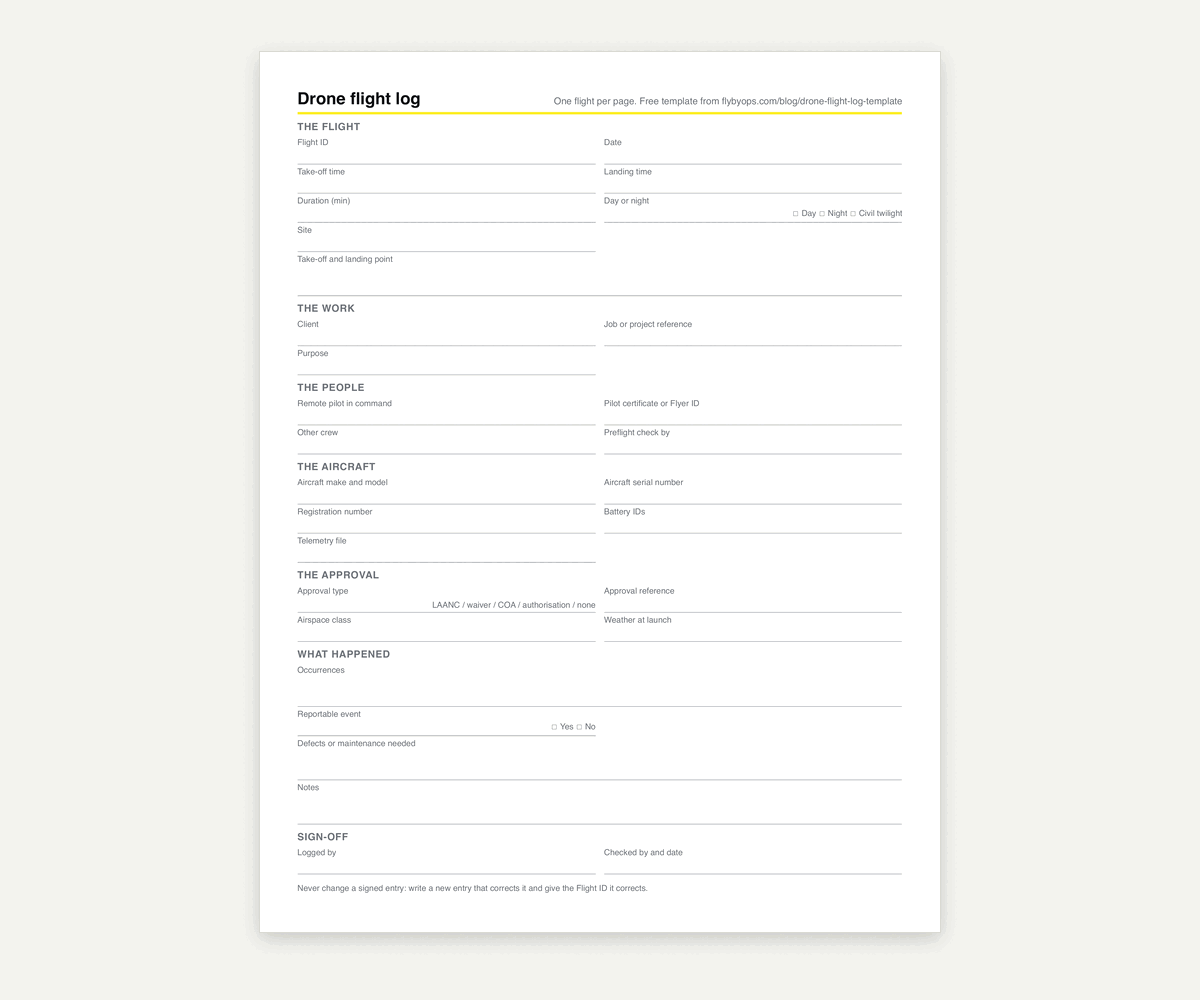
The 30 columns fall into seven groups:
- The flight: Flight ID, date, take-off time, landing time, duration, day or night, site, take-off and landing point.
- The work: client, job or project reference, purpose.
- The people: remote pilot in command, pilot certificate number or Flyer ID, other crew, who did the preflight check.
- The aircraft: make and model, serial number, registration number, battery IDs, telemetry file.
- The approval: approval type, approval reference, airspace class, weather at launch.
- What happened: occurrences, reportable event, defects or maintenance needed, notes.
- Sign-off: logged by, and checked by with the date.
Does the FAA require a drone flight log?
No. Part 107 doesn't require a flight log for ordinary operations. What it does require is that a remote pilot, owner or person on the controls makes available to the FAA, on request, "any document, record, or report required to be kept" under the regulations (14 CFR 107.7). A flight that causes serious injury, loss of consciousness, or damage to other property costing more than $500 to repair must be reported to the FAA within 10 calendar days (14 CFR 107.9). The FAA's own guidance, AC 107-2A, says owners and operators "may find recordkeeping to be beneficial." For the records Part 107 does name, see Part 107 recordkeeping.
A waiver changes that. The three FAA beyond visual line of sight (107.31) waivers we read all require a maintenance log for each aircraft, current lists of pilots and aircraft, and a log entry for each functional test flight: the date, the aircraft's registration number, the remote pilot in command, the flight's duration and the result (waiver 107W-2026-01296 is one).
Outside the US, the rules do ask for a log:
| Rule | How long to keep it | What the log must hold |
|---|---|---|
| Transport Canada, CAR 901.48 | 12 months for crew and flight times, 24 months for maintenance | The names of the pilots and other crew on each flight, and the time of each flight; a maintenance record |
| UK CAA, PDRA01 | No period stated for the flight log; 3 years for flight safety documents and training records | A log for each pilot: name and Flyer ID, date, take-off and landing location, duration with day or night, a description including anything unusual, make and model, serial number |
| EU, Specific category (UAS.SPEC.050) | At least 3 years | Operations, "including any unusual technical or operational occurrences", plus whatever the authorization or declaration asks for |
A UK PDRA01 holder can fill in all seven items the CAA lists from the template's columns. The CAA's own form is CAP 2606B, and our PDRA01 guide covers the rest of that authorization.
Which columns do free flight log templates leave out?
A flight log earns its keep the day someone asks about a flight nobody remembers: which approval covered it, for which client, on which batteries, and who signed it off. We opened six free drone log files on October 22, 2026: two PDF forms, two Word logbooks and two Excel logs. None had a field for the approval a flight flew under or for the client. One had a battery ID, in a separate battery file, and one had a signature line.
The template has approval, client, battery and sign-off columns, plus one for the telemetry file:
- Approval type and reference. A LAANC reference code, a waiver number or an operational authorization number shows which approval covered the flight. A log that says "Class D, approved" doesn't say which approval.
- Client and job reference. These let a program pull every flight it flew for one client.
- Battery IDs. These tie each pack to the flights it flew, so a pack that fails can be traced. Your battery cycle count comes from these IDs.
- Telemetry file. The name of the aircraft's own flight record for that flight, so the written row and the aircraft's data can be matched.
- Sign-off. Who logged the row and who checked it.
Isn't the drone's own flight record enough?
No. It's the aircraft's side of the flight. DJI Fly keeps a "FlightRecord" folder with the flight record and simplified flight controller data on the phone or tablet (DJI support). What it holds is flight data, so the client, the approval, the crew, the purpose and a sign-off still need a row of their own.
It also lives on one device. Since June 12, 2024, DJI no longer syncs flight records to its servers in the United States, and DJI said records that users had synced to its servers would be deleted. The records stay on the local device (DJI support). When a phone is wiped or a pilot leaves with the tablet, those records go too. Export the file, keep it with the program's records, and write its name in the row. How to export DJI flight logs covers where the records sit and what to do with an export.
How should a team fill in the flight log?
- One row per flight, the same day. A battery swap and a relaunch start a new row.
- One workbook for the program, not one per pilot. Hours, batteries and client reports only add up when every pilot uses the same columns.
- Use the drop-downs. "LAANC", "Laanc" and "laanc approved" are three values to a filter, and one to a reader.
- Never edit a checked row. Add a new row that corrects it and say which Flight ID it corrects, so the original stays readable. That's what makes a log tamper-evident.
- Keep it as long as the strictest rule you fly under, or longer if the program's insurer, clients or operations manual ask.
What each field should say to hold up later is in drone flight log: every field a defensible record needs.
When does a spreadsheet flight log stop working?
For one pilot and one aircraft, the template is enough. It stops working once a program has several pilots and sites. Rows arrive late or in a private copy. Edits overwrite the old value, and nothing records who changed what. Batteries, maintenance and the approval paperwork sit in other files. Every client report becomes an afternoon of filtering.
FlybyOps keeps the log in one place for the whole team, and tens of thousands of flights are logged in it each month, mostly BVLOS. Each flight log records the date and time, the pilot in command and crew, the aircraft and the battery used, the duration and location, the client and project reference, the mission objective, weather and notes, and custom fields cover the rest. Each flight record is connected to its project, its pilots, its equipment and its compliance documents, and an append-only audit log shows who changed what and when. Flights from DJI Pilot 2 controllers are logged automatically with Flight Sync and counted toward that aircraft's flight hours and maintenance schedules. DJI flight logs can be uploaded, and flights on other aircraft are entered by hand.
See it in action
Bring your drone program onto one record
FlybyOps gives enterprise drone teams a single audit-grade record for projects, flights, equipment, risks and incidents. Start free — 14-day trial, no credit card.
Start free trial