Manual flight logging asks a pilot to remember and re-enter what the aircraft already recorded. It is the least popular part of the job, it happens at the end of a long day, and it is the first thing to slip when work gets busy.
Flight Sync removes the step entirely. The controller is already talking to the aircraft; Flight Sync simply lets it talk to FlybyOps too.
What Gets Captured
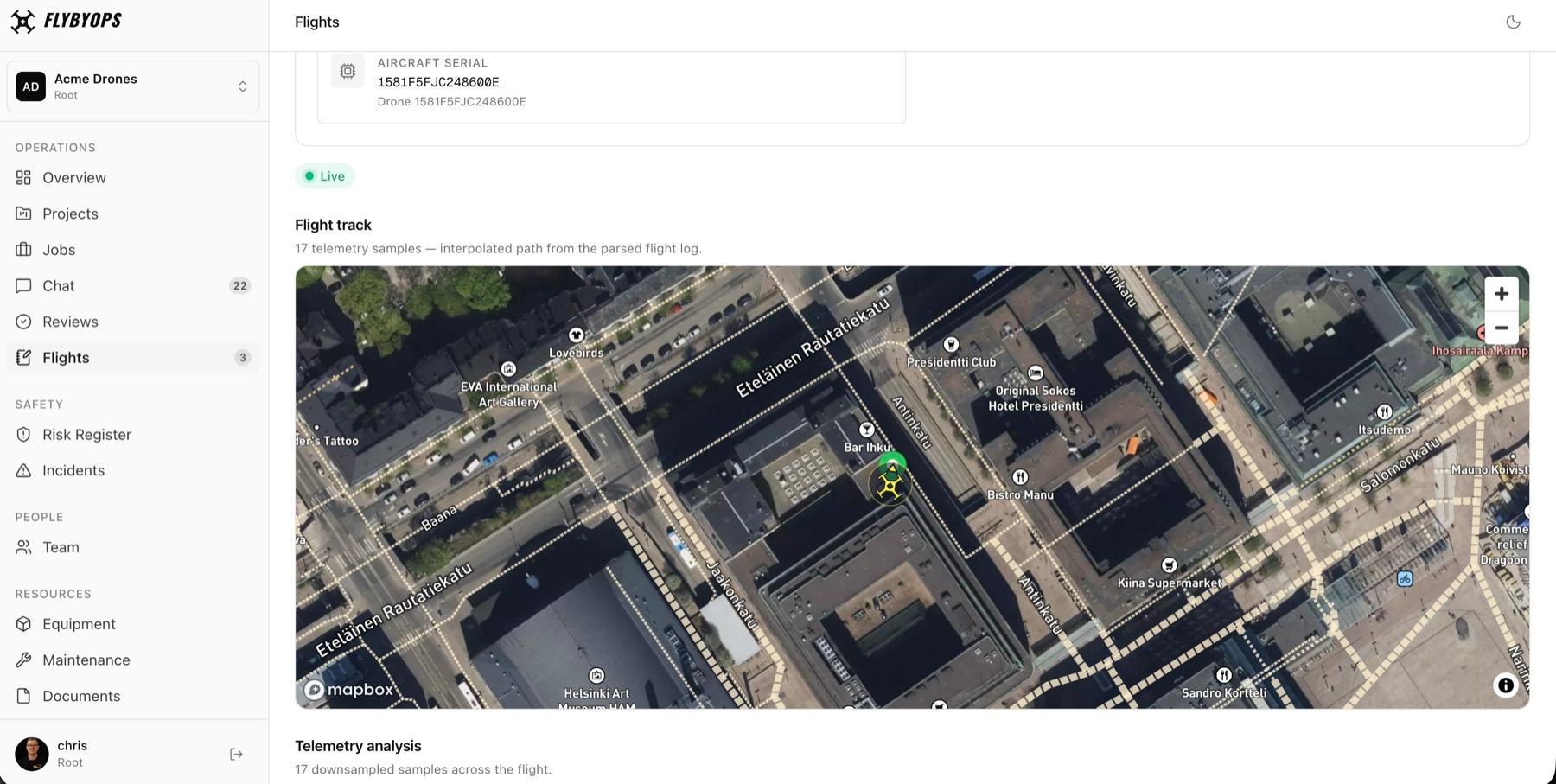
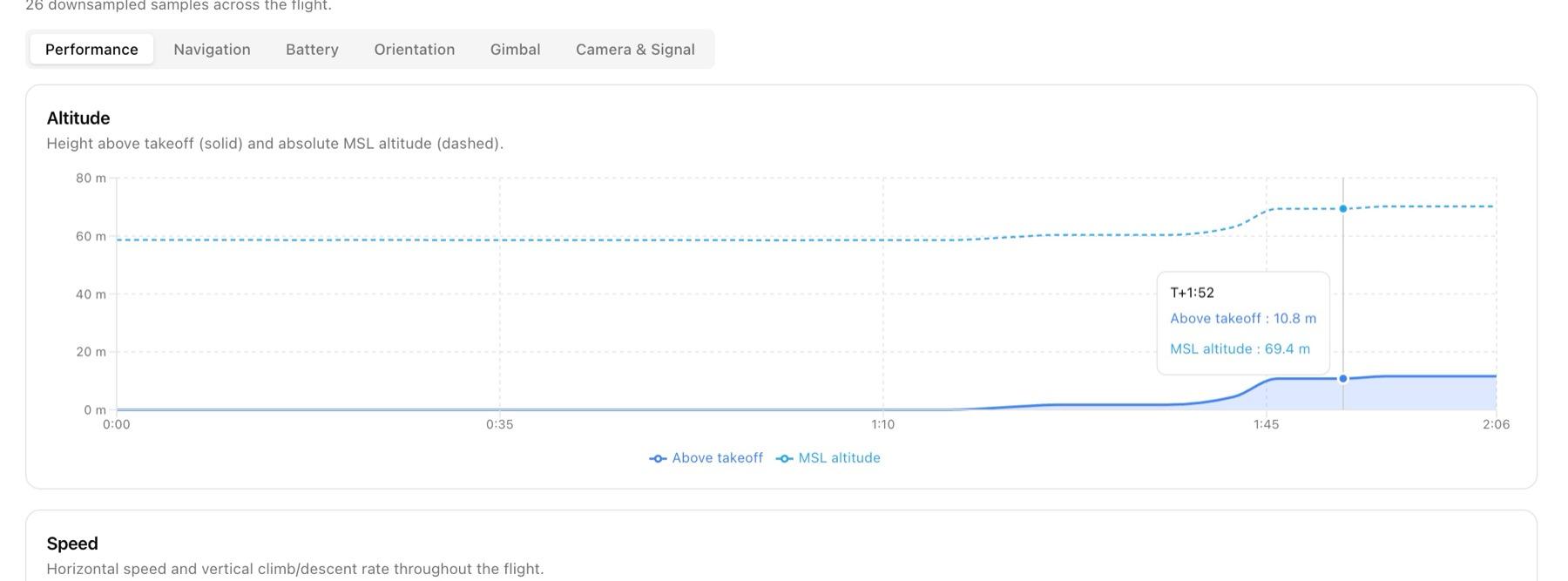
Every flight arrives as a complete record, not a summary someone typed in afterwards:
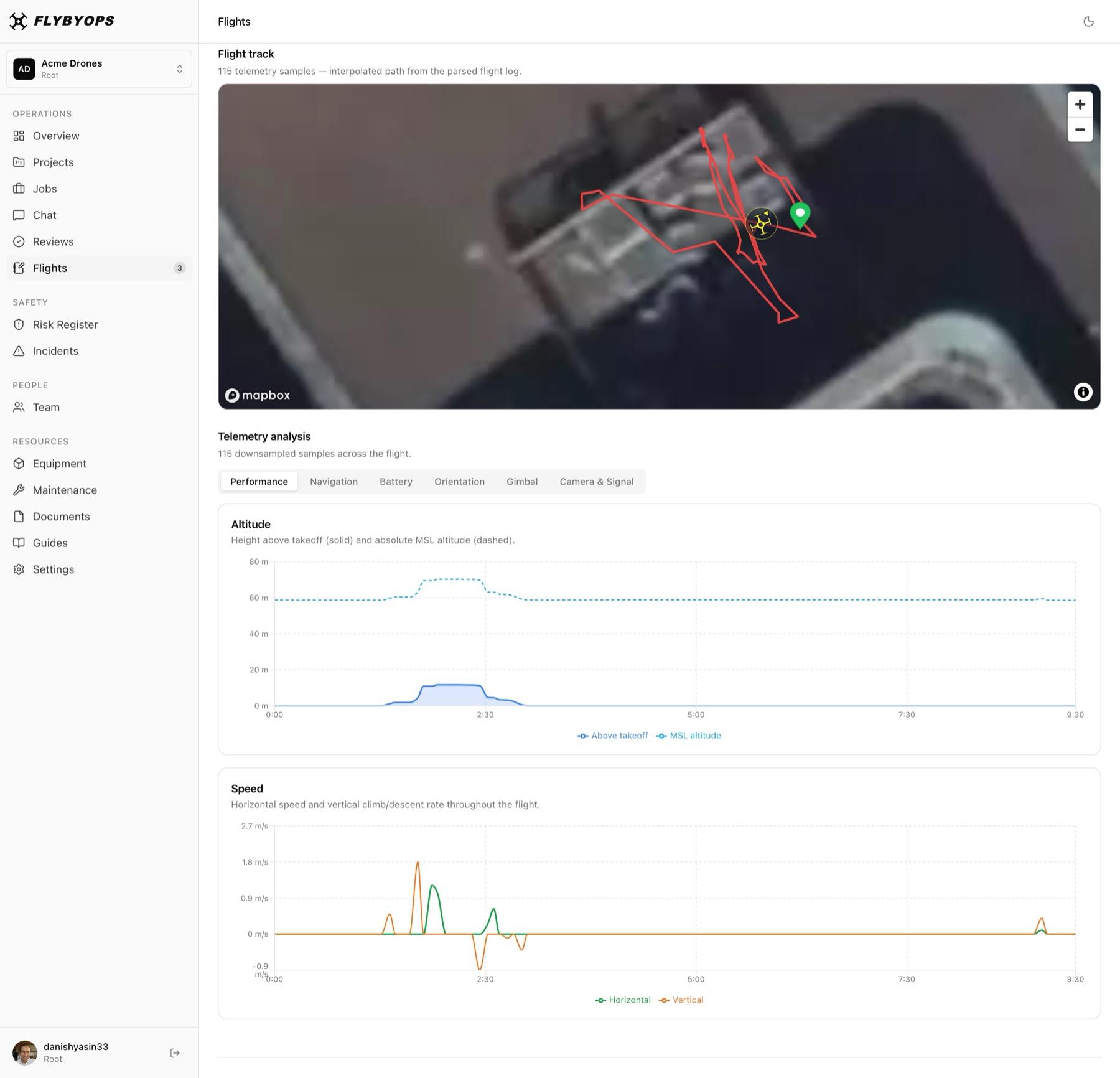
- Full GPS path from takeoff to landing
- Altitude and vertical speed throughout the flight
- Ground speed and heading
- Battery level, voltage and temperature
- GPS quality and satellite count
- Aircraft serial, so the flight links to the right drone in your equipment registry
Watch A Flight As It Happens
A flight in progress is visible in the dashboard from the moment it starts.
Chief pilots, safety officers and operations managers on another site see the flight itself, not a report of it afterwards:
- The aircraft's position on the map, updating as it flies
- The track building behind it, second by second
- Altitude and battery as they change
- A clear warning if telemetry stops arriving, rather than a frozen aircraft that looks fine
Flights Arrive Already Filed
A logged flight is only useful if it is attached to the work it belongs to.
Flight Sync files each flight as it arrives:
- Linked to the project whose area covers the takeoff point
- Matched to the drone in your equipment registry by serial number
- Counted towards that aircraft's flight hours and maintenance schedules
- Sitting alongside the documents, risks and incidents for the same work
Set Up Once, Per Controller
1. Open FlybyOps on the controller
In DJI Pilot 2, go to Cloud Service → Open Platforms and enter your FlybyOps address.
2. Sign in and pick a workspace
Sign in with your FlybyOps account and choose which workspace the controller belongs to.
3. Tap Connect
That is the whole setup. Roughly two minutes, and only ever done once per controller.
Supported Aircraft
- DJI M300 RTK, M350 RTK and M400
- DJI M30 and M30T
- DJI Mavic 3 Enterprise (M3E) and Thermal (M3T)
- DJI Matrice 4E and 4T
- Requires DJI Pilot 2, pre-installed on enterprise controllers such as the RC Plus and RC Plus 2
More Manufacturers To Follow
DJI is the first manufacturer Flight Sync supports, and for most operators it is the fleet that matters today.
Flight Sync was built as a general capability rather than a DJI integration, so support for further manufacturers can be added without changing how any of this works for you. Flights from a new provider will arrive in the same place, in the same shape, alongside the ones you already have.
Manual Logging Still Works
Manual entry is still there. With a connected controller, you just don't need it.
Flights from a DJI aircraft you haven't connected, or from a controller that was offline, can be added by uploading their DJI flight log. Flights from other manufacturers can be entered by hand. Every flight ends up in the same record either way.
Common Questions
- Does the pilot have to do anything before each flight?
- Pairing itself is done once per controller and does not need repeating. Flights are recorded while the controller is connected to FlybyOps, so if it has been disconnected from third-party cloud services in DJI Pilot 2, the pilot needs to reopen FlybyOps from Cloud Service → Open Platforms and reconnect before flying. If the connection is still active, there is nothing to do.
- How does a pilot know whether the controller is still connected?
- Open the FlybyOps page in DJI Pilot 2 before you fly: it shows whether the controller is connected. If a flight is missing afterwards, reconnect the controller and upload that flight's DJI flight log.
- What happens if the controller loses signal mid-flight?
- Telemetry resumes when the link comes back, and the flight record continues. If the link does not return, the flight is closed with everything captured up to that point, and the dashboard shows that telemetry stopped rather than presenting a frozen aircraft as current.
- Can I still see the flight if it takes off outside a project area?
- Yes. The flight is recorded in full. It is held for review so an operator can attach it to the right project, rather than being filed against the wrong one or discarded.
- Does this work with DJI Fly?
- No. Flight Sync uses DJI Pilot 2, which comes pre-installed on DJI's enterprise controllers. Flights from consumer aircraft flown with DJI Fly can be uploaded from their DJI flight log.
- Is flight data sent to DJI?
- Flight Sync sends telemetry from your controller to your FlybyOps workspace. It does not change what your aircraft or DJI Pilot 2 do with data independently of FlybyOps.
- What about flights already logged manually?
- They stay exactly as they are. Flight Sync applies to flights from the point a controller is connected onwards; nothing existing is altered or re-imported.